The following guide walks you through how to obtain an API key. If you already have your API key,
you can also explore practical examples and integration tips to jump start your journey with GPT Chatbot. Let’s begin!
Go to the GPT Chatbot platform.
Step 2: Create an Account (If you don’t already have one)
If you don’t have an account on the GPT Chatbot platform, click on the “Sign Up” or “Create Account”
button and follow the registration process. Provide the required information to create your account.
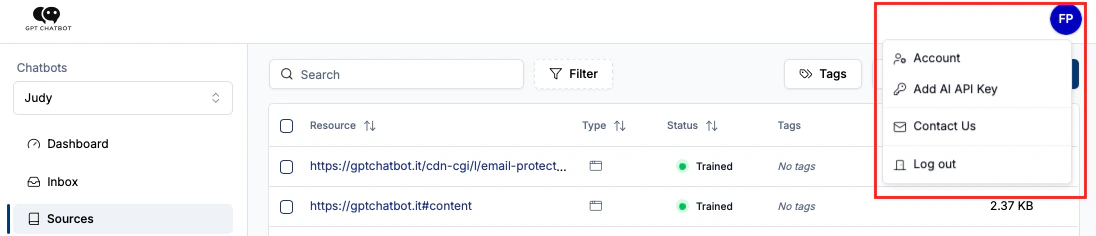
After successfully logging in, you’ll be directed to the app. Look for the “Account” menu in the platform’s
navigation bar. Click on it to access your account settings.
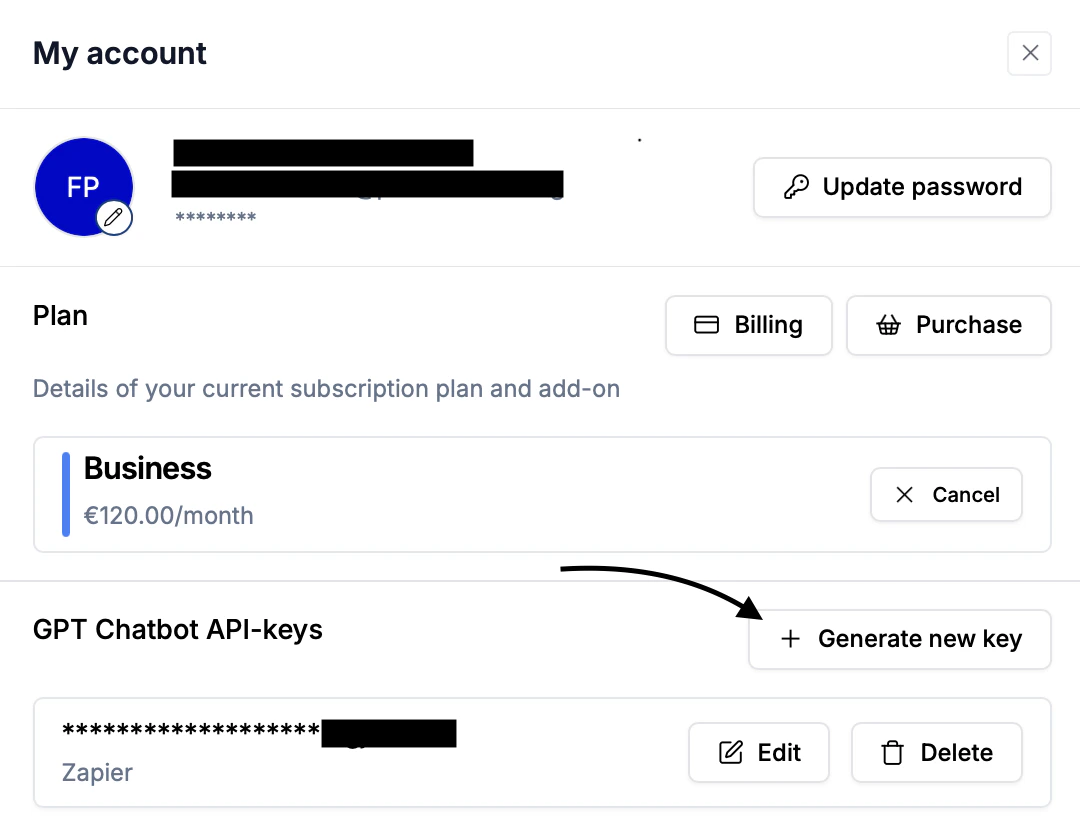
Step 4: Navigate to API Keys Section
Inside your account settings, you will find an “API Keys” section. Within the API Keys section,
you should see an option to “Generate new key”. Click on it to initiate the process of creating a new API key.
Step 5: Enter Key Description and Generate
In the “Create New API Key” dialog, provide a description for your API key to help identify its purpose.
Once you’ve entered the description, click the “Generate” button to create your API key.
Be sure to copy and save your API key in a secure location. Do not share it
with anyone, as it provides access to the GPT Chatbot API services. Treat your
API key like a password.